Presenter's guideline - WS2 : Conveyor & Sensor Integration
Step 8: Add IR Logic to Stop the Conveyor
Action:
-
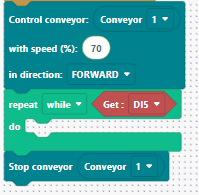
Add a While loop that runs the conveyor until the object is detected.
-
Condition: While DI5 is HIGH → keep conveyor on.
-
After loop: Stop conveyor.
Speaker notes:
“Now we add the logic to stop the conveyor when the IR sensor detects the object. Remember: DI5 is HIGH when no object is detected, and LOW when an object is detected.”
“So I’ll add a While DI5 is HIGH loop — this means the conveyor will keep running while no object is detected. As soon as DI5 changes to LOW, the loop ends and I immediately stop the conveyor.”
“Let’s run it and see — the object should stop just on the IR sensor.”