Loop program
Setup of the Discovery Bundle and modification of the program
Implementation of the Demo_conference_basic
- Setup the robot and the tools following the given pictures and videos.
- Go in Equipments tab and scan the tools
- Open the Blockly code and Create the point of interest.
To change the point of interest, place the robot at the desired position by holding the Freemotion button, then press the SAVE button (⚠️be sure you are in pose mode as the following image).
Once the block appears on the blockly code, drag and drop only the Pose part and place it in the corresponding pose variable (in the orange empty space) then delete the remaining part of the appeared block.
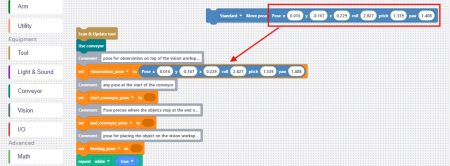
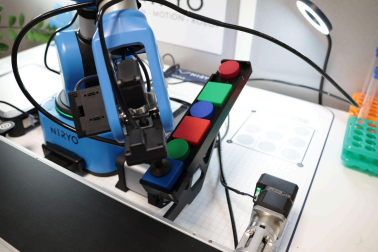
Do the procedure for the 4 following points: To Help you take a good position , you can grasp one of the circle object with the vacuum pump by pressing the Custom button while the vacuum pump is plugged.
a. end_conveyor_pose: Precise position to pick the object when they are stuck at the end of the conveyor belt.They always end at the same place.
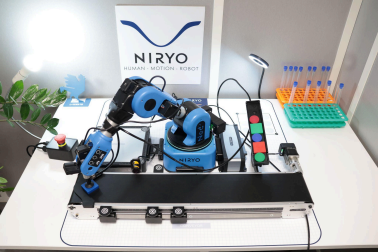
b. start_conveyor_pose : Any position at the start of the conveyor. This is the pose where the robot will place the object.
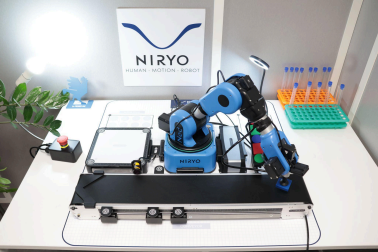
c. top_ramp_pose: Precise position at the top of the ramp. This is where the robot will place the object on the ramp.
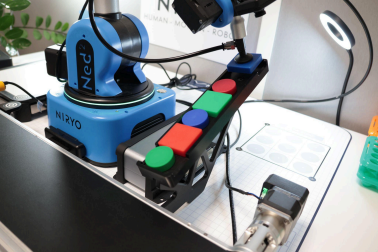
d. bottom_ramp_pose: Precise position at the bottom of the ramp. This is where the robot will pick the object from the ramp.
You can now start the program. It will loop forever until you stop it. If something is wrong with the position you can adjust it as many times as needed.