Program with the Conveyor Belt
| Site: | NiryoAcademy |
| Course: | 🚀 Getting Started with the Ned2 and the Discovery Bundle |
| Book: | Program with the Conveyor Belt |
| Printed by: | Guest user |
| Date: | Saturday, 3 October 2026, 6:34 AM |
Description
 Blockly short tutorials:
- Run the conveyor belt
- With the IR Sensor
 Pyniryo short tutorials:
- Simple Conveyor control
- Advanced Conveyor Belt control (with IR sensor)
Blockly
Special blocks have been designed to be used with the Conveyor. These blocks keep Ned2’s Ecosystem easy to use with NiryoStudio.
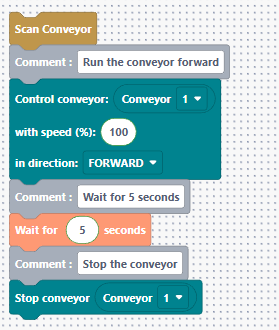
Scan and run the conveyor belt forward
The following code shows how to scan the conveyor and run it Forward.
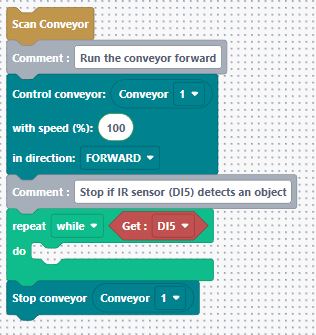
Use the IR sensor
The following code shows how to scan the conveyor and run it Forward until the IR detect an object.
Pyniryo
Simple Conveyor control
This short example shows how to connect a conveyor and launch its motor (control it by setting its speed and direction):
from pyniryo import NiryoRobot, ConveyorDirection

# Connecting to robot
robot = NiryoRobot('<robot_ip_address>')

# Activating connexion with Conveyor Belt
conveyor_id = robot.set_conveyor()

# Running the Conveyor Belt at 50% of its maximum speed, in forward direction
robot.run_conveyor(conveyor_id, speed=50, direction=ConveyorDirection.FORWARD)

# Waiting 3 seconds
robot.wait(3)

# Stopping robot's motor
robot.stop_conveyor(conveyor_id)

# Deactivating connexion with the Conveyor Belt
robot.unset_conveyor(conveyor_id)
Advanced Conveyor Belt control (with the IR sensor)
This example shows how to do a certain amount of pick & place by using the Conveyor Belt with the infrared sensor: