Presenter's guideline - WS3 : Final Quality Check with Vision
Completion requirements
🎯Simulate a real-world quality control station. Participants will use the robot’s vision system to sort objects by color and shape as they arrive on the conveyor.
⏱️2 hours
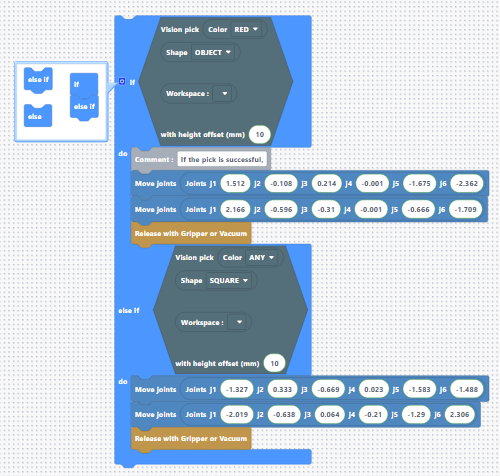
Step 8: Add Else If for Squares
Action:
-
Click the gear icon on the If block to add an Else If. (Drag and drop the else if below the if)
-
Copy and paste the Vision Pick condition block in the new if.
-
Change Color = Any and Shape = Square.
-
Add intermediate position and place position above the storing zone (Alpha zone).
Speaker notes:
“Now we add a second condition: if the object isn’t red, but it’s a square, it should go to the Alpha zone, which is our storing zone.”