


Diese Aktivität ist im Moment nicht verfügbar.
Presenter's guideline - WS3 : Final Quality Check with Vision
Abschlussbedingungen
🎯Simulate a real-world quality control station. Participants will use the robot’s vision system to sort objects by color and shape as they arrive on the conveyor.
⏱️2 hours
Step 11: Add Conveyor Logic (From Workshop 2)
Action:
-
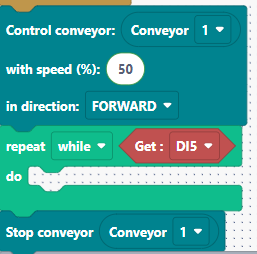
Add a While loop to run the conveyor until the IR module detects an object.
-
Condition: While DI5 is HIGH → keep conveyor on at 50% speed.
-
After loop: Stop conveyor.
-
Place the Vision Pick logic after the conveyor stop.
Speaker notes:
“Now we integrate the conveyor logic we used in Workshop 2. The conveyor runs until the IR sensor detects an object — DI5 goes LOW when something is detected. Once detected, we stop the conveyor and run the vision pick logic.”