Presenter's guideline - WS1 : Pick & Place Basics
🎯Introduce participants to the core of industrial automation. They will learn how to program a simple pick & place task with Blockly, using the NED2’s Learning Mode.
⏱️1 hour
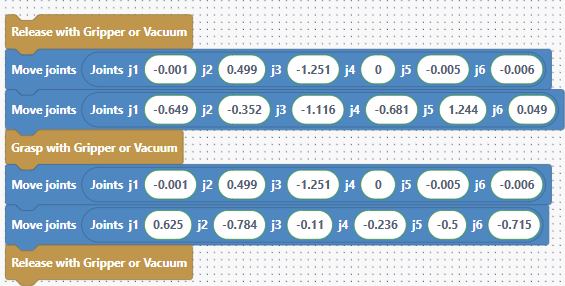
Step 7: Add Gripper Actions in Blockly
Action:
-
In the Blockly program, add:
-
A Grasp action after the second position (object grasp)
-
A Release action after the last position (place)
-
A Release action at the very start of the program to ensure the gripper is open
Speaker notes:
“With all positions saved, we need to tell the robot when to close and open the gripper.”
“Right after the position where the robot grabs the object, I add a Grasp block — this closes the gripper.”
“After the final position, I add a Release block to open the gripper and drop the object.”
“I also add a Release at the start of the program — this makes sure the gripper is open before we begin, preventing any surprises.”
“Now, our program is complete and ready to run!”