Diese Aktivität ist im Moment nicht verfügbar.
Presenter's guideline - WS0 : From simulation to Real world
Requisitos de finalización
🎯Build a complete vision pick and place inside the simulation then Participants transfer the code to the real robot.
⏱️3 hours
Step 4: Create Your First Program in Simulation
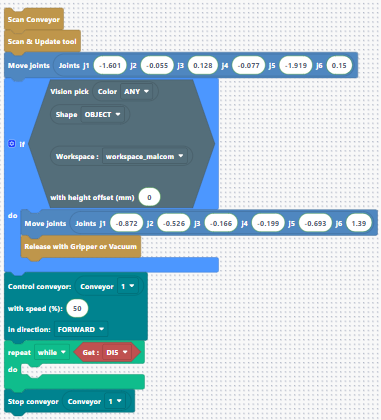
Add Conveyor Logic
We want the conveyor to run until the object enters the conveyor workspace.
-
Add a Run Conveyor block. Put the speed to 50%.
Since you are using the conveyor, add a use conveyor block at the top of your program to ensure the robot detects the conveyor. -
Add the logic for the IR sensor:
-
Reminder: the IR sensor is plugged into DI5.
-
DI5 = HIGH (True) → no object detected
-
DI5 = LOW (False) → object detected
-
Add:
-
While Get DI5 → do nothing (wait).
After the While, stopping condition is reached → stop the conveyor.