


Presenter's guideline - WS0 : From simulation to Real world
🎯Build a complete vision pick and place inside the simulation then Participants transfer the code to the real robot.
⏱️3 hours
Step 5: Improve the Code Before Switching to the Real Robot
You can now run the program and observe the simulation.
The program works — but you may notice the robot passes through obstacles like the conveyor.
In the real world, this is not acceptable.
To safely transfer the program to the physical robot, we must add intermediate positions:
-
After the Vision Pick on the Vision Plate:
-
Move to a position between the vision plate and the conveyor to ensure clearance before moving toward the conveyor.
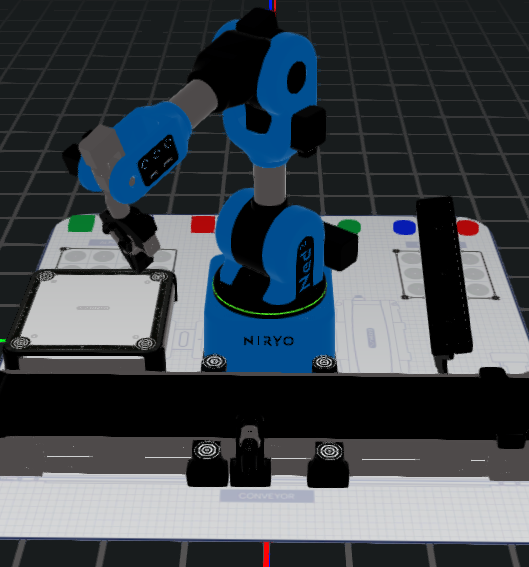
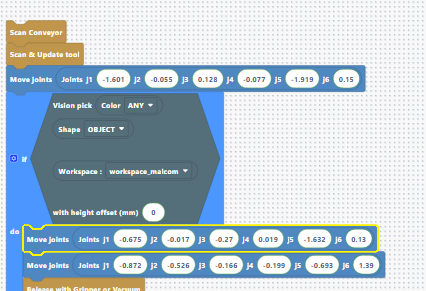
-
After the Vision Pick on the Conveyor:
-
Move to a position high above the conveyor before traveling toward the Beta zone placement position.
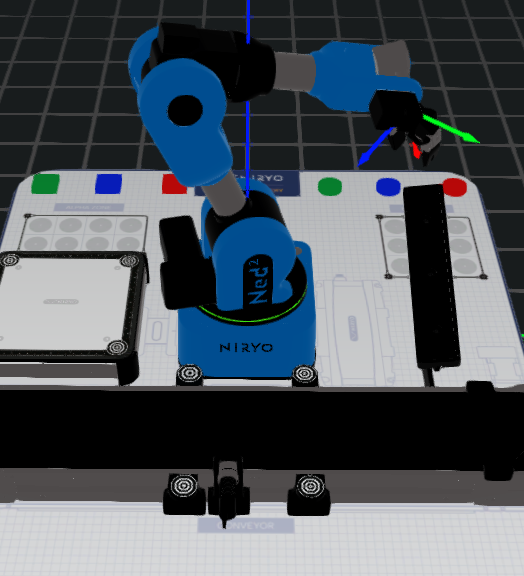
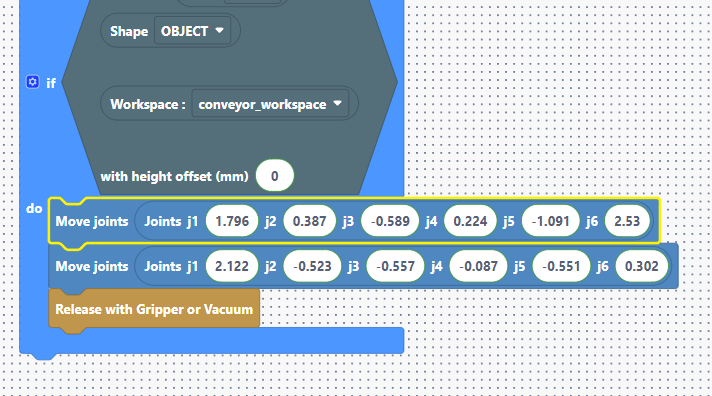
Speaker notes:
“Even if the simulation shows correct movements, the real robot may collide with tools or the conveyor. Adding intermediate positions creates safe trajectories that avoid obstacles.”