


Presenter's guideline - WS4 : Variables management
Completion requirements
Step 3: Open the Variables Palette
Action:
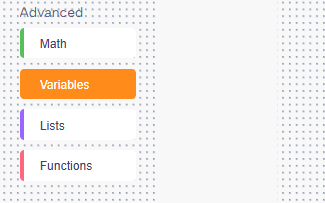
- Show students how to scroll to the Advanced section.
- Click on the Variables category (highlighted in orange).
Speaker Notes:
"Let’s open NiryoStudio. On the left, scroll down to 'Advanced' and click 'Variables'. Notice it looks empty—only one orange button says 'Create variable...'. The workspace stays clean until you decide which 'boxes' your robot needs."