


Presenter's guideline - WS3 : Final Quality Check with Vision
🎯Simulate a real-world quality control station. Participants will use the robot’s vision system to sort objects by color and shape as they arrive on the conveyor.
⏱️2 hours
Step 4: Load and Adjust the Vision Pick Template
Action:
-
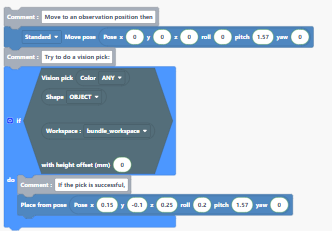
Load the Vision Pick template.
-
Move the robot to a good observation pose above the conveyor workspace so all 4 workspace landmarks are visible.
In the program you can download: the workspace is not defined in the block → you need to add the conveyor workspace you set up before the workshop.
-
Save this position and replace the template’s default position with yours.
Speaker notes:
“We’ll use the vision pick template to speed things up. I move the robot above the conveyor workspace so the camera can see all four landmarks — this is essential because the vision algorithm needs these reference points to calculate object positions accurately.”
“I’ll save this as our observation pose and replace the one in the template.”