Program with the Vision Set
 Blockly short tutorials:
- Simple Vision pick and place
- Empty the Workspace with Vision pick and place
- Multi-reference packaging with Vision pick & place
 Pyniryo short tutorials:
- Simple Vision Pick & Place
- First conditioning via Vision
- Multi Reference Conditioning
- Sorting Pick with Conveyor
Blockly
Vision Pick & Place
Task
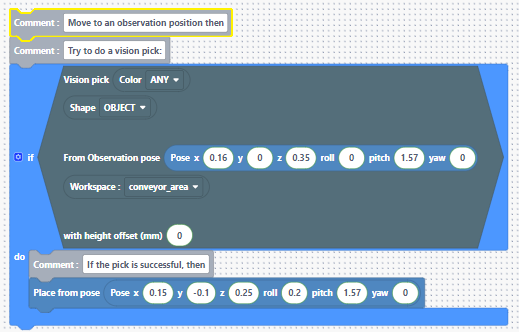
The NED2 has to go to an observation pose above the workspace and pick an object from its workspace using vision. Then, it should place it anywhere.
Solution & explanation
To pick an object using Vision, you can use the Vision Pick Block. It will return True if an object is detected and picked, so it has to be put in a logic condition block ⇨ if the action happens, we can place the picked object. You can find the example in the Templates of the vision tab of Blockly.
💡To change the pose block coordinates, you can save the pose directly using the learning mode.
Change the save mode and select the "Pose" mode.
Empty the Workspace with Vision pick and place
Task
The NED2 has to pick all the objects in the workspace one by one then place them all on the same spot. The workspace can have any number of object without fixed color/shape.
Solution & explanation
To make the Vision pick task, you can use the Vision Pick with Observation PoseBlock which will return True each time the action happens. By using a loop as a condition (here, repeat while), the robot will continue the process until it picked all the objects of the workspace.
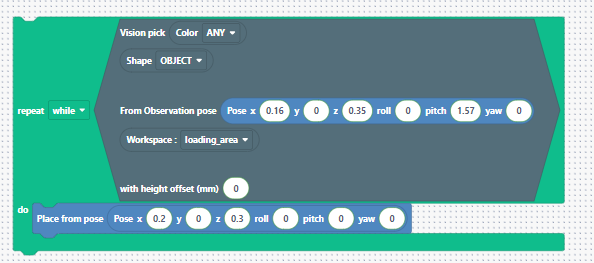
In this sequence, the Ned2 will pick all the objects it can detect on the workspace then activate its learning mode.
Multi-reference packaging with Vision pick & place
Task
The Ned2 has to take all the objects from the workspace and place them at different positions depending on their attributes ⇨ the red objects will be placed in an area and all the other ones in a different area.
Solution & explanation
You will start the process by using the Vision Pick with Observation Pose Block to interact with the red objects only. If the action happens, the object will be placed on a certain pose.
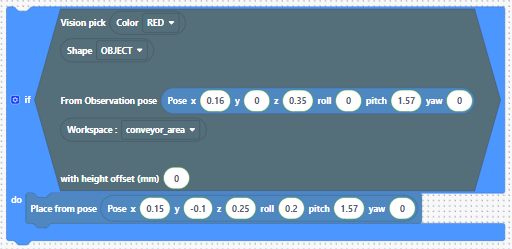
Then, a else
if condition is added. That will be triggered if the first vision pick did not happen, which means that there are no red objects anymore.
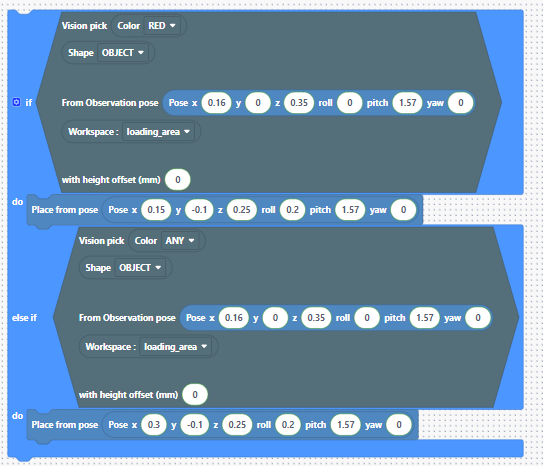
With this program, the Ned2 will try to pick a red object, then place it in an area. If there is no red object in the workspace, Ned2 will take another object to place it in another area.
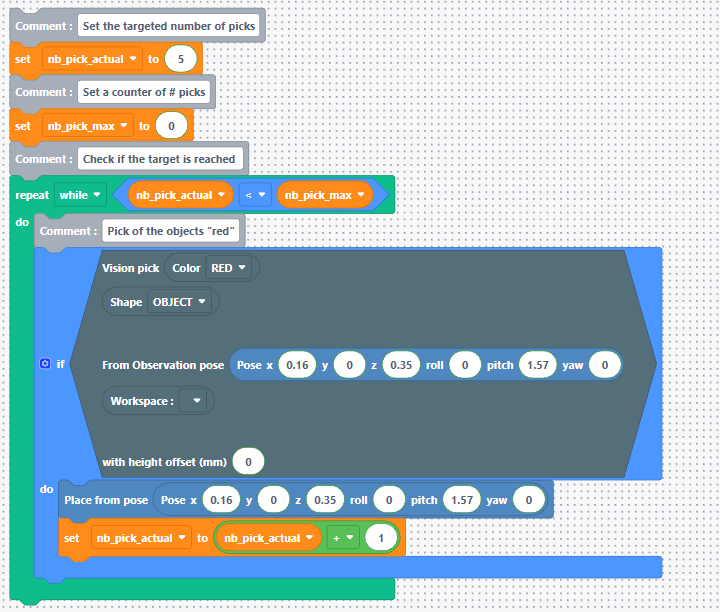
Now, we can use a loop to repeat this sequence for a given amount of objects using variables.